OPEN MESH · FILLED MESH · ROW BY ROW

Free Filet Crochet
Pattern Generator.

Create your own filet crochet patterns with an easy online chart maker. Draw open and filled mesh squares, turn names or simple words into charts, and generate printable patterns with foundation chains and row-by-row instructions.

Free mesh charts & downloads No signup required
Filet chart studioFREE
Opening your saved chart…
Filet chart controls
21 × 18 meshes
100%
The filet grid couldn’t load. Try opening this page in an up-to-date browser.
Click & drag filled meshesRow numbers bottom → top · arrows show working direction

Use arrow keys to move, Space or Enter to paint the current brush, and Delete for open mesh. Select Pan and drag to move around a large chart.

Column 1, crochet row 1, open mesh
Made in your browser. Your designs stay yours. Zoom and pan for larger mesh charts.

This browser keeps only your latest filet chart. A blank grid, name chart, or template replaces it. Download work you want to keep; PNG/PDF files cannot be reopened here for editing.

FROM GRID TO HOOK

How to Create a Filet Crochet Pattern

From your first mesh to a printable pattern in four steps.
STEP 1

Choose Blank Grid, Name, or Example

Open the editor and pick a starting point: Blank grid for a custom motif, Name / Text for a word or monogram, or a free example (heart, flower, border, and more).

Loading a template or name chart replaces the current draft in this browser. Use Undo once if you only wanted a peek, or download first if the previous chart matters.

STEP 2

Set Your Mesh Size

Set width (meshes across) and height (rows). Choose your grid size before drawing. Making the grid smaller removes meshes from the top or right.

Choose US (dc) or UK (tr) terms and row-1 direction. Those settings change the written instructions and the foundation chain, not the picture of open vs filled squares.

STEP 3

Edit Open and Filled Squares

Paint filled blocks for solid lace and open meshes for windows. Row numbers count from the bottom; arrows mark the working direction of each crochet row.

Watch the results panel while you edit: open/filled counts, foundation chain, and the first rows of instructions update live so you can catch a mirrored edge early.

STEP 4

Download Your Crochet Chart

Export a PNG overview for quick reference, or a PDF with numbered mesh pages, legend, foundation chain, and full row-by-row text.

Enter your swatch gauge (meshes and rows per 10 cm) to include estimated finished dimensions in your download.

New to mesh charts? Continue with open vs filled, then the foundation chain example.

CROCHET FILET CHART BASICS

Open Mesh vs Filled Mesh in Filet Crochet

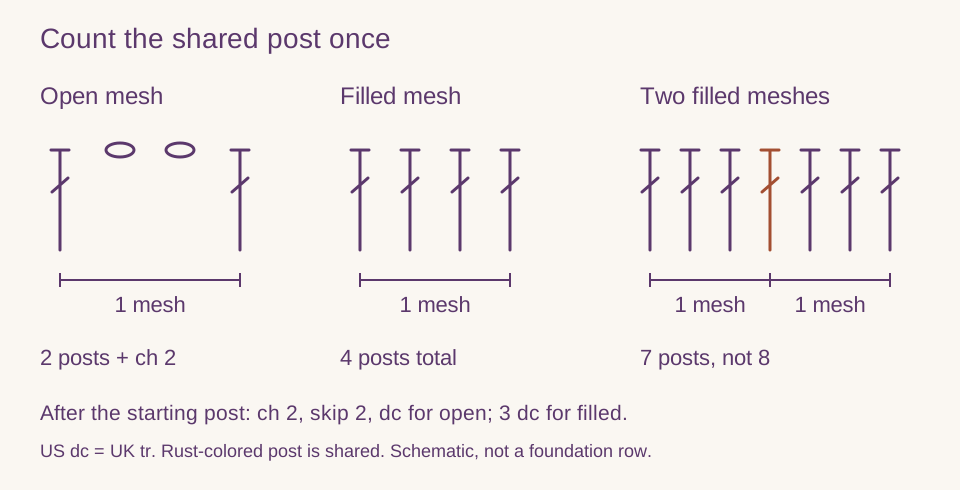
A filet crochet chart is a grid of open and filled meshes—not a multi-color tapestry graph. Each square is one mesh. Neighboring meshes share vertical posts, so a filled block is not four brand-new independent tall stitches sitting alone in the square.

  • Classic mesh on this page

    This generator supports classic US double crochet + chain 2 mesh (UK treble + chain 2). Empty square = open mesh; solid square = filled mesh (block).

  • What you actually work

    After the starting post of a mesh, an open mesh is typically chain 2, skip 2, tall stitch in the next post. A filled mesh places tall stitches across those same two spaces, then the shared post. Written rows in the PDF follow that shared-post model.

  • Read bottom to top, alternate direction

    Crochet row 1 is the bottom of the chart. Flat work alternates direction; editor arrows show which way each row is written so left and right edges stay honest when you follow the text.

Open mesh, a four-post filled mesh, and two adjacent filled meshes sharing a central post for seven posts total
Each extra filled mesh adds three posts, because its starting post already exists. The rust-colored post belongs to both neighboring meshes. Symbols use US dc (UK tr). Tap the diagram to view it full size.
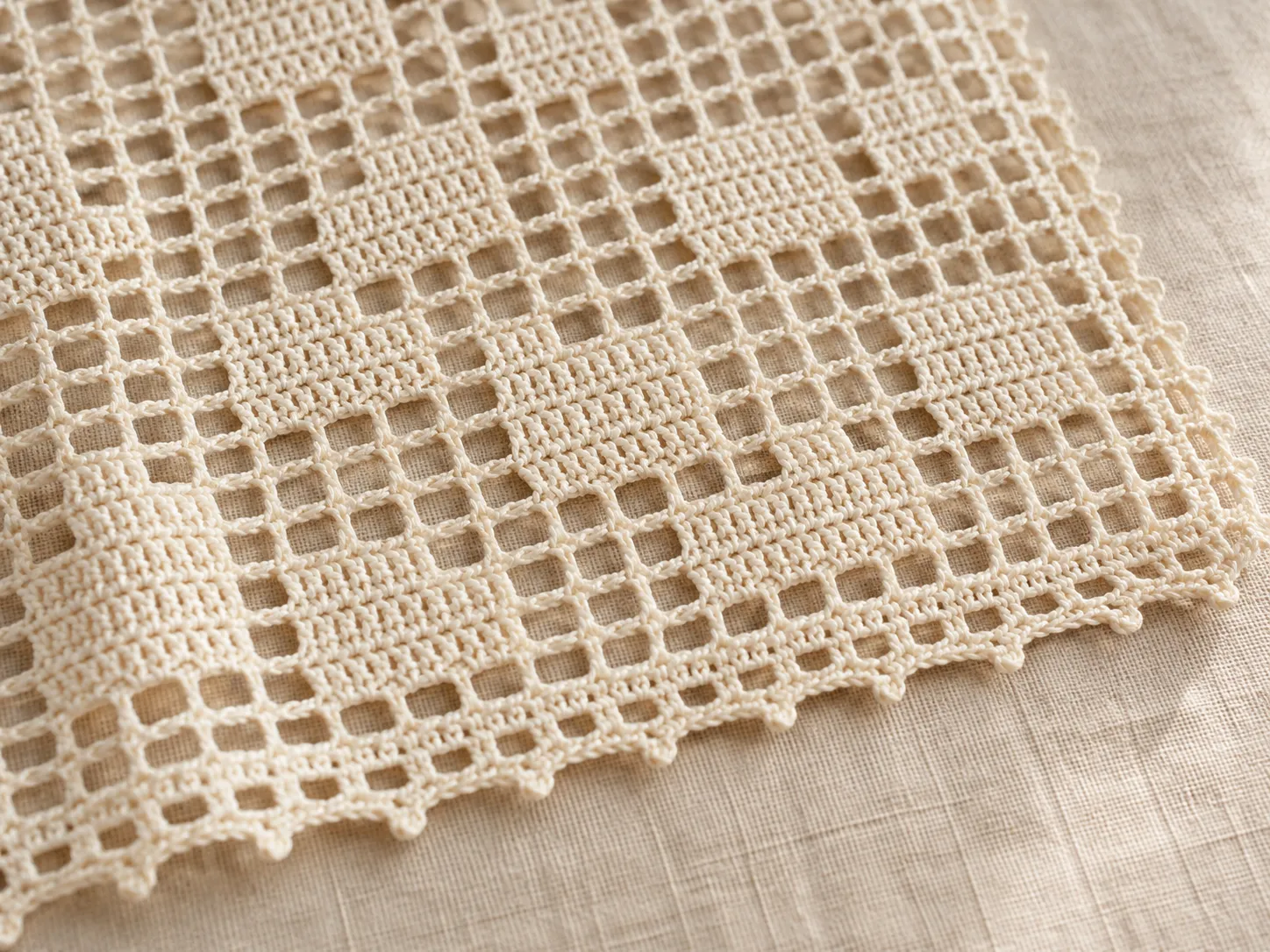
Close-up of ivory filet crochet lace with open mesh windows, filled geometric blocks, and a looped edging on linen
Open windows and filled blocks in real crochet fabric. This photograph is a texture reference, not a stitched sample of the ANNA chart or a pattern generated by this tool. The decorative edging is separate from the generator’s mesh instructions.
FILET CROCHET NAME PATTERN GENERATOR

Make Filet Crochet Name Patterns

Short words become bordered mesh charts
you can still edit square by square.

What the text tool does

Type a name, monogram, date digits, or short word in the editor’s Name / Text field and choose Make. The tool lays an uppercase pixel font onto open mesh, adds a simple filled border, and sizes the grid to fit—then you can paint, invert, flip, or resize like any other chart.

Limits that keep letters crochetable

Characters are A–Z, 0–9, and basic punctuation (space, hyphen, period, apostrophe, and a few marks), up to 24 characters. Long phrases grow the width quickly; prefer a first name, initials, or a short word, then add decorative borders by hand if you need more width.

After the chart appears

Check the foundation chain—changing the first mesh of row 1 (bottom, in your working direction) changes the chain count. Invert if you want filled lettering on an open field or the reverse. Download when the mesh stats and first written rows look right.

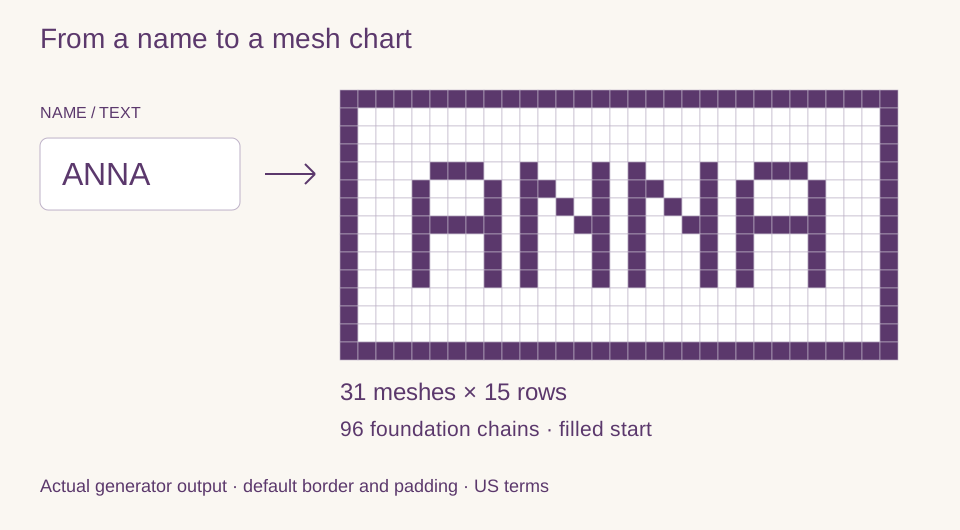
ANNA input and its generated 31-mesh by 15-row filet chart with a filled border and 96 foundation chains
ANNA with the default border and padding: 31 meshes × 15 rows, 96 foundation chains. This is the generator’s actual chart, not a finished-fabric preview. Tap the diagram to view it full size.

To try it, enter ANNA in Name / Text and choose Make. The filled bottom border gives a filled start: 31 × 3 + 3 = 96 chains. With row 1 set to right → left, paint just the bottom-right square open and the total becomes 98. Undo to restore the border. Creating the name chart replaces your current draft; download it first if you need a copy.

Try ANNA in the name tool
CHAINS, DIRECTION & WRITTEN ROWS

Foundation Chain and Row Instructions

See how to calculate your starting chain.
Follow the examples to read your chart row by row.

Foundation chain convention (classic dc + ch 2)

Body width uses 3 chains per mesh (shared posts). Then add turning chains for row 1 based on the first mesh you work on the bottom row:

  • First mesh open → meshes × 3 + 5 (turning ch-5 counts as first tall stitch + ch 2).
  • First mesh filled → meshes × 3 + 3 (turning ch-3 counts as first tall stitch).

“First mesh” follows row-1 direction. Default is right → left, so the first mesh is the bottom-right square. Switch the editor to left → right and the first mesh becomes the bottom-left square. Turning chains for row 1 are included in the total—do not chain them again before the first row.

WORKED EXAMPLE · 10 MESHES

Open start on row 1

Bottom row, right-to-left, rightmost square open (the default blank grid). Foundation = 10 × 3 + 5 = 35 chains. Begin the first open mesh with a tall stitch in the 8th chain from the hook (US dc / UK tr).

WORKED EXAMPLE · 10 MESHES

Filled start on row 1

Same width, but the first worked mesh is filled. Foundation = 10 × 3 + 3 = 33 chains. Begin with a tall stitch in the 4th chain from the hook. Paint only that starting corner filled in the editor and watch the results panel jump from 35 to 33.

ROW READING PRACTICE

8 meshes × 3 rows

Read the chart from the bottom up. By default, work row 1 right → left, row 2 left → right, and row 3 right → left.

  1. Row 1 (right → left)OOOOFOOO4 open, 1 filled, 3 open
  2. Row 2 (left → right)OFFFFFOO1 open, 5 filled, 2 open
  3. Row 3 (right → left)OOOFFFOO3 open, 3 filled, 2 open
See row 1 stitch by stitch (US terms)

Row 1 starts with an open mesh -> chain 29 (columns x 3 + 5).

Row 1: Work into the foundation: dc in 8th ch from hook (first open mesh; turning ch-5 counts as first dc + ch 2); ch 2, sk 2 ch, dc in next ch (open); ch 2, sk 2 ch, dc in next ch (open); ch 2, sk 2 ch, dc in next ch (open); dc in each of next 2 ch, dc in next ch (filled); ch 2, sk 2 ch, dc in next ch (open); ch 2, sk 2 ch, dc in next ch (open); ch 2, sk 2 ch, dc in next ch (open).

The PDF includes step-by-step instructions for every row in your chosen US or UK terms.

Filled squares form a small peak. Work row 1 from the bottom-right open meshes toward the center filled mesh.

Gauge and finished size

Make a swatch with your project yarn, hook, and mesh stitch. Wash and block it as you plan to treat the finished piece, then measure an interior area away from the edges. Count meshes across and rows vertically over 10 cm. Enter both measurements in the editor; leave gauge blank if you have not swatched.

US and UK terms

US double crochet (dc) is UK treble (tr). Switching terminology rewrites abbreviations in the results panel and exports. Chain (ch) stays ch; skip becomes miss in UK text.

Calculate width and height separately

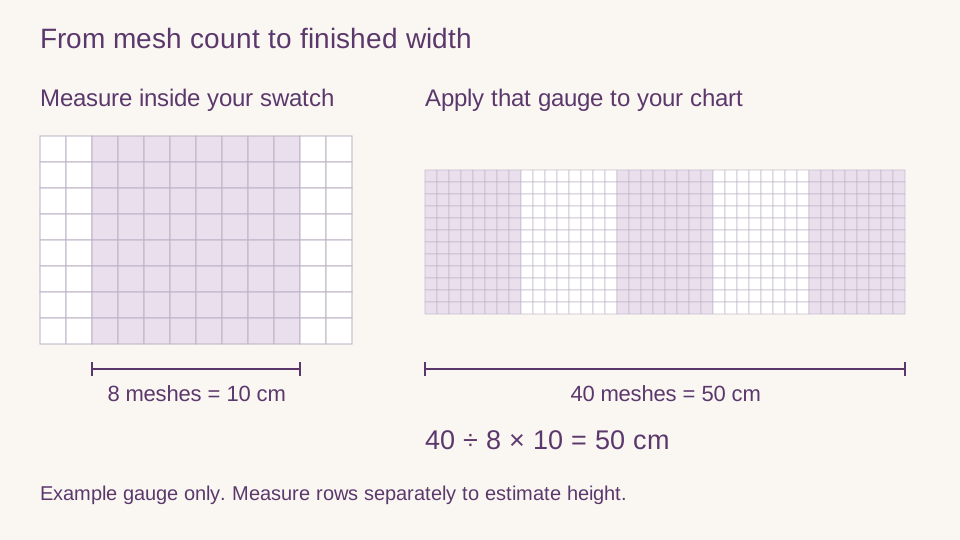
Width in cm = meshes across ÷ meshes per 10 cm × 10. Height in cm = rows ÷ rows per 10 cm × 10. For a 40 × 30 chart at 8 meshes and 10 rows per 10 cm, expect about 50 × 30 cm, before any extra edging. Square chart cells do not guarantee square fabric meshes.

Eight meshes measured over 10 centimeters inside a swatch; at the same gauge, 40 meshes give a finished width of 50 centimeters
Example gauge, not a recommended tension. Use your own measurements; print scale does not set fabric size. Tap the diagram to view it full size.
FREE PRINTABLE FILET CROCHET CHARTS

PNG for a quick look.
PDF when you need numbered pages and full rows.

What the PNG includes

Title, mesh size, open/filled counts, the full grid with numbers, a key to open and filled meshes, foundation chain summary, optional gauge size, terminology note, and a preview of the first written rows. Handy for phones and quick printouts of small motifs.

What the PDF adds

An overview page, tiled numbered chart pages (up to 40×40 meshes each) for large designs, then foundation text and every row’s summary plus stitch detail. Print at 100% / actual size so the numbered squares stay readable; printed square size is not your finished lace measurement.

Drafts vs downloads

This browser keeps only your latest filet chart. Blank grid, name chart, and templates overwrite it. PNG and PDF cannot be re-imported for editing—download anything you may need again. Examples below load into the same editor so you can change every mesh before exporting.

Jump to free editable examples or export from your current chart.

FREE FILET EXAMPLES

Free Printable Filet Crochet Charts

Original open-and-filled starters.
Load any example into the editor and edit every mesh.

Filet heart

21 × 18 · 175 filled

A small open-and-filled heart motif for a panel, insert, or gift tag.

Practice counting shared posts around a curved silhouette.

Simple flower

23 × 23 · 109 filled

A centered blossom with open mesh background for a doily-style square.

Alternate filled petals against open mesh while keeping the center solid.

Butterfly

25 × 17 · 141 filled

A symmetrical butterfly chart you can work as a panel or window insert.

Mirror left and right wings; check both sides before you download.

Night star

21 × 21 · 97 filled

A pointed star on open mesh for ornaments or repeating borders.

Stepped diagonals teach careful open/filled changes on each row.

Geometric border

36 × 12 · 164 filled

A repeating diamond border strip for edgings and table runners.

Short rows with a clear repeat — good for foundation-chain practice.

Name banner

41 × 15 · 166 filled

Sample “LOVE” lettering you can replace with the Name / Text tool.

See how pixel letters sit on a filet grid before typing your own word.

CHECK BEFORE YOU RESTART

Common Filet Crochet Problems

My letters look mirrored

Read row 1 from the bottom in the direction selected in the editor, then alternate direction on each row. Check lettering from the intended display side of the fabric. Changing row direction changes the instructions, not the chart picture; only flip the chart if you intend to mirror the design.

My motif looks taller or wider than the chart

Chart cells are square, but your crochet meshes may not be. Measure both mesh and row gauge after treating your swatch as you will the finished piece. Check the estimated width and height before starting a large name banner.

The starting chain changed by two

Check the first worked square on the bottom row. Switching it from filled to open adds two chains in this generator’s convention. Row-1 turning chains are already included; do not add them again.

My rows gain or lose meshes at the edge

Count meshes, not just tall stitches. Adjacent meshes share a post, and the turning chain counts as the first post. Compare the start and end of the row with the PDF stitch detail, especially where open and filled meshes meet.

CHOOSE THE RIGHT CHART

Filet Crochet vs Tapestry Crochet

This filet generatorHomepage colorwork graphs
Each square meansOne open or filled meshOne US single crochet in a yarn color
Look of the fabricLace grid with windows and blocksSolid colorwork / picture fabric
Instructions emphasizeFoundation chain, mesh runs, shared postsColor changes and stitch counts per color
Use whenYou want a filet crochet chart makerYou want a multi-color graph maker

Do not treat a colorwork square as a ready-to-work filet mesh—the stitch math is different. For multi-color picture graphs with flat or in-the-round color-run instructions, use the Tapestry Crochet Pattern Maker. To turn a photo into a color graph first, use the Photo to Crochet Pattern converter. For a general color grid without tapestry modes, use the homepage free colorwork graph maker. Stay on this page for open-and-filled mesh, foundation chains, and written filet rows.

BEFORE YOU CHAIN ON

Filet Crochet Pattern
Generator FAQ

Free use, name charts, foundation math, open vs filled mesh, printing, and how this differs from colorwork graphs. For a numbered walkthrough, see the foundation and row examples.
Is this filet crochet pattern maker free?

Yes. Drawing open and filled meshes, the name/text tool, free examples, local saving, and PNG and PDF downloads are free. There is no account, subscription, or watermark on the chart or the written rows.

How do I make my own filet crochet chart?

Start with a blank grid, a free example, or the Name / Text tool. Set mesh width and height, choose US or UK terms and row-1 direction, paint open and filled squares, then read the live foundation chain and row summaries before you download. Making the grid smaller removes meshes from the top or right.

Can I turn a name into a filet crochet pattern?

Yes. Enter a name, monogram, or short word (A–Z, 0–9, basic punctuation, up to 24 characters). The tool builds a bordered mesh chart with an uppercase pixel font. Edit any square afterward, invert filled and open if you want the opposite lace look, and export when the chain count looks right.

Can I convert a photo to filet crochet?

Not into a filet open/filled mesh chart. For a multi-color graph from a picture, use the Photo to Crochet Pattern converter. Here you can still build filet charts from a blank grid, an example, or the Name / Text tool.

How many chains do I need for filet crochet?

For this generator’s classic mesh, use width in meshes × 3, then add 5 for an open start or 3 for a filled start. Row-1 turning chains are included. The results panel calculates your total; the foundation examples below explain where to place the first stitch.

What is the difference between open and filled mesh?

An open mesh is a tall stitch with a chain-space window. A filled mesh (block) works tall stitches across that same space. Neighboring meshes share posts, so you should not count each block as four brand-new independent tall stitches. Empty chart squares are open; solid squares are filled.

Can I download a printable filet crochet pattern?

Yes. PNG gives a single overview with legend, counts, foundation summary, and a preview of written rows. PDF adds numbered chart tiles (up to 40×40 meshes per page) and full row-by-row stitch text. Print PDFs at 100% / actual size for readable numbering. Estimated finished dimensions are included only when you enter your swatch gauge.

What is the difference between filet and tapestry crochet?

Filet crochet is a lace grid of open and filled meshes with chain spaces and shared posts. Tapestry-style colorwork is usually solid single crochet with yarn colors changing for a picture. Use this page for filet mesh charts; open the Tapestry Crochet Pattern Maker for multi-color graphs with flat or in-the-round color-run instructions. The two charts are not interchangeable stitch-for-stitch.

Does my filet chart save automatically?

Your latest filet chart saves in this browser only (separate from the homepage colorwork draft). A new blank grid, name chart, or example replaces it. Clearing site data or using private browsing can remove it. Download PNG or PDF to keep a copy; downloads cannot be reopened here for editing.

Open windows. Solid blocks. Your chart.

Design the mesh, then download instructions you can crochet from.

Back to filet editor